
insert_pixel_code_here(Facebook Pixel code)
Effects Of AI On Social Media

Effects Of AI On Social Media

EFFECT OF AI ON SOCIAL MEDIA

Today’s world is an era of information explosion, with just a click information comes knocking. Social media is a part of our day-to-day life that can’t be ignored. Unsurprisingly, it has both positive and negative effects.

With social media platforms like Facebook, Twitter, Instagram, etc. the world has been inseparably connected, making communication, networking and relationship easier. Social media has grown over the years to become a large platform for entrepreneurs, businesses, organizations and various other professionals who seek identification and recognition at a moderate cost. And in order to succeed, businesses and organizations opt for Artificial Intelligence which is becoming more and more common in today’s world and social media seems to be doing the same. With the growing technology, a wide variety of tools are being used in order to target the right audience on social media. And AI is creating a better journey for users by developing a better user experience on social platforms.

Here’s how AI is transforming Social Media:
Statistics show that social media user base as of the year 2019 is estimated up to 2.77 billion. Artificial Intelligence needs to be properly applied, keeping the entire focus on the current business need. As social media users are growing at an unprecedented state, the business need is to efficiently process the unstructured data. And Artificial Intelligence is providing solution to exactly that.

A study by McKinsey has highlighted that, in the year 2016, Machine Learning constituted around 60% of the total external investment of approximately $8 billion to $12 billion towards AI. With upwards of 3 billion people logging into social media sites regularly, the process of optimising social media marketing has received a massive boost through the application of AI.

Approximately 2 billion internet users are active on social media. That’s almost one in every four people in the world. They are constantly updating their statuses, tweeting their every move and thought, uploading new photos and videos, or posting new thoughts and conversations. This is a whole lot of information that marketers could be using to target customers and sell products to them by using artificial intelligence.

Where AI is already incredibly helpful is where it's being used as social media monitoring tools. They allow you to ‘listen’ to what is being said about your brand, your competitors and your industry in general. You can then use this data to understand your audience better and improve your marketing strategy. You can also be alerted to conversations about your brand or industry, and chime in at a relevant time. This allows you to be seen as an industry expert and useful resource.

The reality is it will take time for AI to ever replace authentic human conversations and interactions. Tools are already improved to the point where they can create strong bonds with customers. But it’s up to your staff to reach out and ensure those leads result in conversions. To read more about the importance of social media monitoring have a look at our recent article. It’ll give you some tips of how you can improve your online strategies and provide support for customers.

Empowering marketers:  companies are better leveraging social media through artificial intelligence. It’s helping them to better understand their customers buying personas, which, in theory, should help to market more relevant products.

Marketers can personalize content for their customers by understanding buying habits, people’s everyday environments and what motivates them to make their decisions. And AI can learn these habits at a rate much faster than any human. The ever-changing environment of social media makes it harder for companies to keep on top of trends. Which is why they are turning to AI to is a smart move. Machine learning algorithms analyze everything that is happening on social media in real time and convert the information to tangible data for marketers to utilize.

AI studies data and makes recommendations based on its findings. Such vast information would typically take months for a human to cultivate. Deep learning, algorithms, and data-sets empower AI, which in turn streamlines the process for marketers.

The main goal of any organization is customer satisfaction. Research has shown that about 60% of the organization’s priority is customer satisfaction. In order to gain high satisfaction amongst customers, organizations are striving to enhance their customer service. With the advancement of Artificial Intelligence in marketing, organizations can now deliver high-grade services to their customers.

Lastly, it is interesting to identify the fact that AI is here to aid business administration and enhance productivity.

Please, kindly share your thoughts or concerns on the topic; do you agree with our position on AI effect on social media? What are the possible changes you will like to see on social media as a result of AI?

How to create Awesome Shareable LinkedIn Content

How to create Awesome Shareable LinkedIn Content

How to create shareable LinkedIn Content

What do you understand as LinkedIn? It is a social media platform that allows members (both workers and employers) to create profiles and "connections" to each other in an online social network which may represent real-world professional relationships Members can invite anyone (whether an existing member or not) to become a connection.

Below are how to create shareable LinkedIn Content:

1. Know and understand your target audience
Before you start writing, take a moment to identify your target audience. It is difficult to get people to share your content if they don’t care about it, so it is important to figure out who you target audience is and cater your content to them. All you need to do is ask some basic questions.

Who: Are you targeting artisans, students, retired couples, teenage girls, marketing professionals, engineers, musicians, or scientists?
What: What does your target audience need? Create something that will help them.
When: When is your target audience online? Publish with those times in mind.
Where: Where do they live, work, and play? Someone who lives in Egypt doesn’t need a list of Spain’s best restaurants.
Why: Why is your audience online? Are they looking for specific information, socialization, entertainment, or validation?
How: How does your target audience experience the internet? Are they using a computer, or do they do most of their browsing on a smart phone? Make sure your content is compatible.

2. Use a headline that attracts attention:
First impressions are essential. It doesn’t matter how good your content is if no one bothers to read it because it is unattractive. There are many different ways to write an engaging headline, and the following are some useful tips.

  • Include a promise in your title: Everything You Need to Know about Star Wars
  • Numbers let your reader know what to expect: 7 Reasons 80’s Kids Love Star Wars
  • Ask questions to stimulate curiosity: Which Star Wars Character is Your Soul Mate?
  • The Ever Popular “How To” article: How to Become a Jedi

3. Include an image with a call to action
When sharing an article in a group or on your LinkedIn profile, LinkedIn will automatically pull in the featured image from the post. This shows up in the preview to the left of the text. This image is a great place to add a call to action telling the reader to click for more information. Here is an example of how we use this feature here on the GuavaBox blog.

4. Share your guest post, less spammy
On social media, particularly in LinkedIn groups, slimy marketers have ruined the fun for all of us. By “spamming” groups with links back to their website, they have made community moderators extra wary of any links shared back to a user’s website. It doesn’t matter if your article is extremely valuable, there is still a good chance the moderator will flag it as spam. One way to share your content and still make the moderator happy is to focus on sharing your guest posted content.

5. Make it useful
Content that recognizes and solves problems is also more likely to be shared. Although an article about fixing your bathroom sink may not seem very interesting, it is a common problem many people have to deal with. If someone finds your content helpful, they will share it with others who face the same problem. If you run a business that sells clothes, write a blog post with ideas about how to accessorize an outfit. If you sell compost, share an infographic with the best times of the year to plant a garden. If you sell craft supplies, share a video that demonstrates how to make your own wreath or decorative pillow case. Give your customers content that helps them use your product or service, and they might just share it with friends.

6. Make information accessible
There is a LOT of information online. When people are reading online, they skim the page to see if the content they need is there. If a reader doesn’t find what they are looking for at your site, they will move on quickly. Here are a few tips for making information accessible:

  • Use headings and sub headings to clearly identify your topics.
  • Use lists to make information easy to organize.
  • Write short paragraphs. Shoot for 3-4 sentences.
  • Use straightforward language. Your vast vocabulary may be impressive, but that doesn’t make it accessible to the average reader.
  • Use images to illustrate your points.
  • Create an infographic to explain complicated data and statistics. Infographics like the one in this post are easier to understand and more fun to read.
  • Use white space. Giant blocks of text are intimidating, and it is difficult for readers to quickly identify the information they want in long passages.
  • Creating content that people want to share is hard work, but it will pay off when the traffic to your website hits a new high. Use these tips to create high quality content that your users will be compelled to share.

5 Essential Social Media Management Tools

5 Essential Social Media Management Tools

5 Essential Social Media Management Tools 


There are a lot of tasks marketers have to complete when it comes to social media marketing, ranging from content creation to content publishing, down to analytics and reporting. To manage these tasks effectively with minimal time, there are some awesome essential social media management tools available to help streamline your workflows, save time and ensure your content reaches the right audience at the right time. In this article, we shall be looking at 5 essential social media management tools that you can use to achieve your social media marketing goal. 

In simple terms, a social media management tool is software that allows one or more users to manage one or more social media profiles on one or more networks in one dashboard or program. To amplifies all aspects of social media management (creation, scheduling, publishing, monitoring, analytics, interaction, and collaboration).

These are 5 of the best social media management tools we at scubedstudios like to use

Social media management tools help with a variety of tasks: content planning and publishing, social listening, commenting and engagement, customer support, analytics, reporting, and more. A variety of tools are available to fit into any budget: from free tools for businesses on a budget to tools for agencies or small businesses. Each includes different features and options to best suit your team's needs.

Let's go through each of our recommended social media management tools to help you find the best.
1. Sprout Social
2. Social Pilot
3. Sendible
4. KeyHole
5. Zoho Social

1. Sprout Social

5 Essential Social Media Management Tools

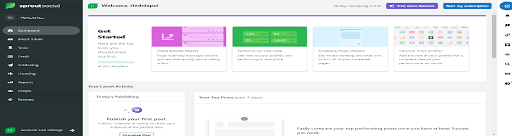
Sprout Social is an all-in-one social media management tool that allows businesses of all sizes to manage all aspects of their social media strategy. By integrating with Facebook, Instagram, TikTok, Twitter, LinkedIn, Pinterest, YouTube, and other platforms, you can work with your entire online presence in one dashboard. You can also manage reviews from sources like Google My Business and Facebook and create shoppable posts that integrate with Facebook stores and Shopify catalogs. Make sure your employees also defend this brand. The employee advocacy tool provides a curated source of content for your employees to share on social media and expand the reach of your business.

Features:
Post, schedule, monitor, analyze, report, and more on social media in one easy-to-use dashboard. Access our ViralPost feature to ensure you publish your content when it is most likely to resonate with your followers, increasing visibility and automatically reaching you. Smart inbox that collates all your incoming messages from different social media platforms and gives
you a complete overview of all your social interactions. The ability to identify the most relevant hashtags for your Content. Custom URL Tracking to get a more detailed view of how your posts are performing in terms of referral traffic and truncate conversions.


2. Social Pilot

5 Essential Social Media Management Tools

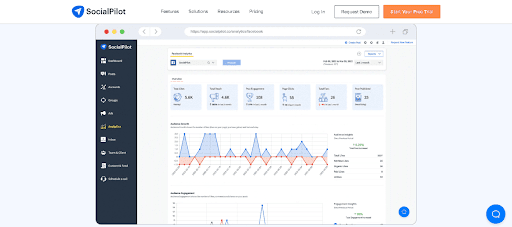
SocialPilot is a simple and straightforward social media management solution for those just starting out with a management tool. In addition to posting and scheduling, the tool provides a curated list of content based on categories and keywords and is automatically shared to your feed. SocialPilot provides detailed analytics to help develop better strategies. Content performance and audience insights enable users to understand which audience they are engaging with and analyze growth patterns to continue creating content.

Features:
Integrate with Multiple major social media platforms including Facebook, Instagram, TikTok, and YouTube. Ability to customize and optimize posts for multiple social networks in a single post editor. One platform Content Curation provides a list of content to inspire you with new ideas.


3. Sendible

5 Essential Social Media Management Tools

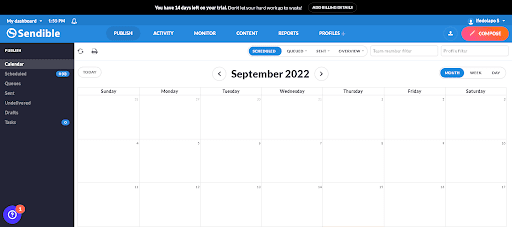
Sendible has done great niche work, working to tailor its social media management software specifically for agencies and other large companies that manage some social media profiles. They also offer several useful integrations to make managing social media as easy as possible for your users.

Features:
An all-in-one dashboard that makes it easy to see all your social media performance immediately Collaboration tools your team uses to create content and then send it to the client or team leader for approval can. Presentation-ready reports showing clients the ROI of your social media efforts. A mobile app to monitor and manage your social media accounts on the go can.


4. KeyHole

5 Essential Social Media Management Tools

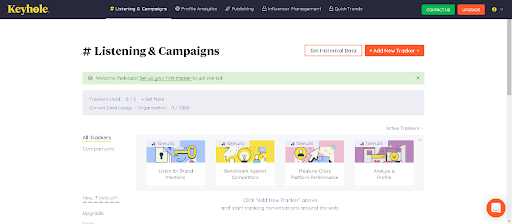
KeyHole differs from most of the tools on this list in that it also boasts of being an influencer marketing and tracking tool. The Influencer Analytics feature gives marketers the data they need to understand how each influencer is impacting their campaign goals. In fact, social media reports are your daily bread.

Features:
Automated social media reports that can be shared and are up and running in seconds. Various reporting features include brand reports, campaign reports, hashtag reports, and influencer reports.


5. Zoho Social

5 Essential Social Media Management Tools

Zoho Social is a tool with features " built for all social networks&quot. The app lets you start discussions, share reports, create team roles, and encourage feedback. This makes it easy for anyone to participate in your updates, strategies, and performance stats. In addition to scheduling, the platform has its own streamlined syncing features like Sprout. Zoho Social
also has a built-in Instagram scheduler that allows you to post and repost user-generated content right from your desktop.

Features:
Instant integration with Zoho CRM and the ability to monitor customer interactions. Dashboards to control social Listening to track brand ratings, @mentions, and branded keywords.
Ability to collaborate with teammates within the platform via chat, audio, and video calls.

10 Tips To Help You Drive More Leads Conversion

10 Tips To Help You Drive More Leads Conversion

10 Tips to help You Drive More Leads Conversion

 In leads conversion, most of your leads won’t automatically convert into sales by simply sending it through your conversions funnel. It will often require additional help to produce the conversion. Below are some tips to help your business convert more leads into sales.   (1) Use visuals:A very high population of the audience are visual learners. So, it is not surprising that articles with visuals get 94% more views than the ones without and thus drives more leads conversion. Although, it is not just enough to just have any image on your site, they should be of quality and should send the right messages. Occasional use of graphs and charts to display the advantage of the product is also a welcoming idea. The use of videos is also important.   (2) Offer specials and Incentives:Offering of specials like incentives can also convert your leads into sales. If I may ask, is the someone in this 360degree world that does not like free stuffs? I guess the answer is “no”. Note that the discount doesn't have to be something outrageous and the free gift doesn’t have to be of high monetary value. Just be moderate in the offer.   (3) Develop a great FAQ page on your website:Many leads won't convert because the potential still have questions that they need answered before they can become your customer. For one not to lose this kind of customers, you must answer and reply these FAQs and make them prominent on your website. Ensure that your sales and customer service team put together a list of these frequently asked questions.   (4) Teach Your Audience:Today’s buyers are more sceptical and difficult to convince. They are highly informed and can easily get prices and learn everything about a product even before been approached by a sales person. Also, with the advent of the internet, most of these customers get almost all their information online. Therefore, it is important to be the one to reach your prospective customers. You should help customers make their decisions through sales enablement white papers, videos, infographics and other content marketing practices to better inform the customer.   (5) Ask for the next action:To convert your leads to sales, it is important to make information available to help the prospective buyers take the next step in the sales process. The customer is invited to learn more, download a report and request on more information. These online interactions help in converting leads into sales by showing which leads are ready for the next step and which is still in the research phase of the buying process.   (6) Monitor your sales pipeline:Your sales pipeline gives you a unique overview over the prospects you are working with. You should monitor which stage of the sales process the prospects are in and the activities that are done. This can be done by each individual salesperson and the sales manager to get a complete overview   (7) Qualify the lead first:To provide a valuable first impression, it's important that you qualify the lead first. This can be done through an assigned coordination or by the sales team. Perform a quick google search on the person or the company or search for the company in your CRM software. find out if the lead has already performed an action such as attending a conference, events, workshop, etc.   (9) Get contact’s information:Most times websites alone cannot do everything, humans too can be very important. Even if most of the information are on the website you it may not be advisable to rely solely on it. You should get the contacts of these customers to continuously be contacting them, especially in reaching the targeted sales leads.   (10) Call as soon as possible:Now that you have their contacts, call them as soon as possible. This can also be referred to as follow up. According to research most firms fail to follow up with 70% of their leads. A simple call back within two minutes or less increases the likelihood of purchase by four times.   And here is a bonus tip(11) Score your leads:Now that you have enough leads, it is good you score the leads. Not every lead should be added to the sales pipeline. Implement a quality control system by allowing only the high score leads in and nurturing the rest. Qualified leads will have similar traits to previous prospects. They should have the right title and budget authority with a serious need and interest. When you have a lot of leads not ready for sales, do not ignore them, just nurture them in their decision-making process pending until when they will become sales worthy.
Web Design Trends In 2019

Web Design Trends In 2019

Web Design Trends in 2019 

Lately, the internet has grown and changed a lot in various ways, like the reign of mobile. Even with the development in technology, where the change is obviously seen is in web design trends. recently, design trends have pushed towards rampant creativity, abandoning grids and traditional stock photos for vibrant illustrations, bold color schemes and asymmetrical layouts, bringing out the beauty in technology and blending it with arts and creativity. In 2019, web design trends will be seeing both aesthetics and technology come together like never before. Below are some dominating web design trends for 2019. 

(1) The 3-Dimensional illustration: 

The 3-Dimensional illustration popularly known as the 3D illustration really has contributed tremendously to the innovation of web design. The concepts of the 3D are to add depth and realism to graphics designed to blur the boundaries between the digital and physical world. In real sense, it sharpens the contrast between digital products and human beings, even as it brings them together into imaginary spaces where people can grasp and manipulate digital elements. Below are some beautiful 3-Dimensional images.  

(2) Vibrant colour Palettes: 

Using a bright colour is one of the trends in web design in 2019. From gradient backgrounds to bright image overlays to animations that feature moving colours. Many of these bright colours have evolved from other design trends. Bright colours started gaining popularity with flat designs, morphed into even more vibrant colors with material design and now some of these hues have a hint of neon in them. When properly blended they give you a very beautiful image that will give you that satisfaction you deserve. 

(3) Emotional Design: 

The concept of emotional designs is for you to create a connection with the users. Emotional connections fall into four basic categories, joy and sadness, trust and disgust, fear and anger, surprise and anticipation. Every visual element in the design provides a cue to users about how they should react. 

(4) Videos: 

Just like colors, videos in 2019 are bolder and more eye-catching than ever. It is one of the great trends of web design in 2019.The key is finding the right balance so that your written copy and video don’t compete for user's attention. Videos are more product focused to help your website visitors understand how your product works and how it will benefit them, hence it is more explanatory and easier to comprehend.  

(5) Geometric and Organic Shapes: 

Colorful shapes are being used on more and more of the top designed sites this year.  With continued improvements in web design technology, it’s become easier for designers to step outside the grid to express brand identity. Many designers are using circles, triangles, and rotated squares to draw users’ attention and communicate subtle messages about the brand. Because organic shapes are naturally imperfect and asymmetrical, they can provide depth to a web design that makes page elements stand out. They are based in nature (think of the curving forms of trees and hills), but free-drawn elements can capture the spontaneity of man-made accidents such as paint splatter. The goal here is for web designs to feel human and alive through the illusion of movement. 

(6) Glitch arts: 

A glitch art is the practice of using digital or analog errors for aesthetic purposes by either corrupting digital data or physically manipulating electronic devices. Glitches are significant in our modern times when computers are so pervasive. We fear the machines taking over, but we also don’t know what we’d do without them. Hence, the breakdown of technology makes for appealing subject matter both as an idea and in its design execution, where it can draw the viewer’s eye to those parts of the site that are warped, double exposed and glitchy. It’s a strange, futuristic time we live in, and no one is quite sure where it is all heading. Glitch art amplifies this feeling of disorientation by giving websites a distinctly psychedelic look. 

(7) Outlined Types: 

There’s something elusive about this kind of half-there, half-gone text that immediately draws in and holds the eye, demanding that you follow the letterforms to their natural conclusion. Which makes it a pretty handy technique for some memorable branding. In a world where chunky sans serifs dominate branding, a visually lighter letterform certainly does capture a feel of traditional — but different. Which in the end is what any new brand needs: a sense that it’s both revolutionary and trustworthy? 

(8) Bright and gorgeous gradient: 

In the past few years, more and more designers have adopted color gradation in design. In 2018, the fluid gradient was quite popular. Even if only one color is used, it can create a rich layered structure with the help of gradients and different images, resulting in an aesthetically pleasing experience. The use of bright gradients and bold illustrations will be one of the mainstream color combinations in 2019. 

(9) Creative and bold typographic: 

The layout of the web page is just as important as the content displayed on the interface. Statistics show that more than 95% of the information on a webpage is text. In terms of influence on users, typesetting is second only to web color matching and images. Below is an example of what I just explained above; Adventurous, bold typography impresses the audience. Carefully selected fonts with a very bright color as the background, can convey the emotions you need and build a powerful visual hierarchy. In fact, more big names are starting to use their own exclusive fonts to enhance their brand's recognition. 

(10) Overlapping design elements: 

Falling closely in line with broken grid layouts and asymmetry, having items overlap each other can bring visual interest to specific types of content on a page. This can bring an element of the unexpected as we’ve grown accustomed to elements on a web page having their own space and separate from the elements around them (generally not touching one another. When done with careful consideration, the trend of overlapping elements on a page can help enhance the overall aesthetic of the site. This can also be pretty difficult to execute giving the mobile-first world we live in, as overlapping elements if not done well can cause confusion and frustration of users when elements overlap in the wrong ways. 

(11) Curated visuals: 

A powerful illustration can communicate volumes and is more versatile than a photograph. Curated visuals are unique and authentic, can quickly portray powerful emotions, help reduce the prominence of gender and race when illustrating people, make abstract concepts easier to understand, because of these curated visuals are in fact, one the most common trends of web design in 2019. 

Pin It on Pinterest